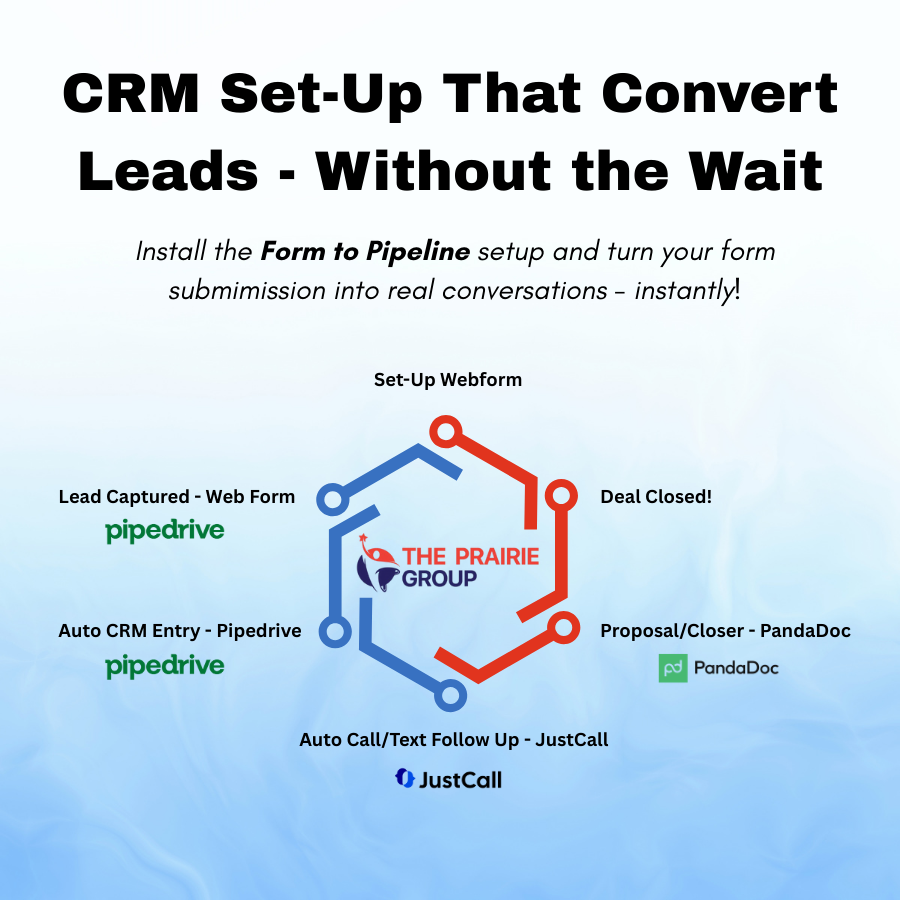
Fix Slow Sales Follow-Up in 30 Days with Pipedrive + Automation
Slow sales follow-up costs you leads and revenue every day. Most service businesses waste hours chasing cold leads or losing track of inbound calls. This guide shows exactly how to fix slow follow-up in 30 days using Pipedrive and CRM automation with Apollo, JustCall, and PandaDoc. Follow this plan to tighten your speed-to-lead, automate follow-up, and close more deals faster. Book your free audit or start a 30-day trial today.
Enhance Sales Efficiency with Automation
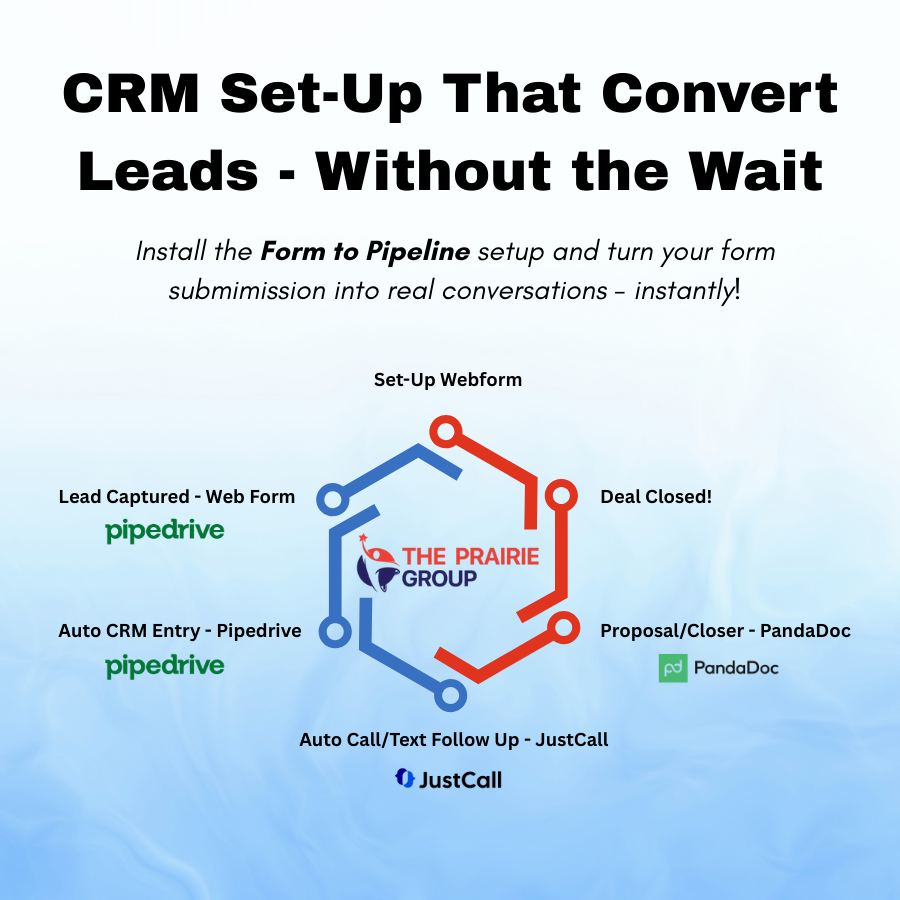
Every moment counts in sales. Speed matters. This section uncovers how to boost sales efficiency using CRM automation.
Speed-to-Lead Essentials
Imagine capturing a lead and responding in minutes. Quick responses can make or break a deal. With tools like Pipedrive, you can prioritize your leads instantly. This means that every lead gets the attention it deserves right away. Speed-to-lead is not just a concept; it’s a practice that you can start mastering today. Think of it like being the first in line for a great opportunity. In a world where leads have choices, being first can set you apart. While others are still figuring things out, you’re already making an impact.
Automate Your Follow-Up Process
Following up is crucial. Yet, many lose track. Automation can change that. With CRM systems, you can schedule follow-ups automatically. This ensures that no lead falls through the cracks. Imagine having a system that reminds you when to reach out. You can even set it to send emails or texts. This keeps your pipeline active without extra effort. Automating this process means you can focus on closing deals instead of remembering to follow up. It’s like having an assistant who never forgets.
Overcome CRM Confusion
CRMs can be overwhelming. But they don’t have to be. The key is using them correctly. Pipedrive offers a simple interface that helps you organize your sales process. You can track deals, contacts, and tasks all in one place. This clarity makes it easier for your team to work efficiently. Think of Pipedrive as your command center. Instead of juggling multiple tools, you have everything in one spot. This reduces confusion and increases productivity. The right CRM can make your sales process feel like a breeze.
30-Day Action Plan
Over the next 30 days, you’ll transform how you handle sales follow-ups. Each week focuses on a different aspect of your CRM strategy.
Week 1: Pipedrive Setup
Start by setting up your Pipedrive account. Create pipelines that match your sales process. This week, you’ll focus on customizing stages and fields. Make sure every step in your process is clear. This foundation will support the rest of your automation efforts. Setting this up correctly saves time in the long run. It ensures that you have a streamlined process from the start. By the end of the week, your pipeline should reflect your actual sales journey.
Week 2: Apollo.io and JustCall Integration
Now, let’s integrate Apollo.io and JustCall. These tools help with lead generation and communication. Apollo.io sequences automate outreach, ensuring no lead is left behind. JustCall keeps all phone interactions organized within Pipedrive. By having these tools work together, you create a seamless experience for both your team and your leads. Integrating them means your team spends less time on admin and more time on selling.
Week 3: PandaDoc Proposal Tracking
Proposals can be a bottleneck. With PandaDoc, tracking proposals becomes effortless. Start by linking PandaDoc with your CRM. This week, you’ll focus on creating templates that you can reuse. Your team can send, track, and sign documents all from within Pipedrive. This integration speeds up the proposal process. It lets you know when documents are viewed, so you can follow up at the right time. It’s about moving deals forward with less hassle.
Week 4: Refining Your Sales Workflow
With everything set up, it’s time to refine. Look at your sales workflow and identify any sticking points. Use Pipedrive’s analytics to see where improvements can be made. This is the week to tweak and adjust. Maybe it’s adding a stage, or perhaps it’s changing how leads are assigned. The goal is to create a smooth, efficient process from start to finish. By the end of the month, your CRM should be a well-oiled machine.
Maximize Revenue Opportunities
You’ve set up the systems, now it’s about making the most of them. Maximizing opportunities is key to growing revenue.
Avoid Missed Leads
Missing a lead means missing revenue. Ensure your system alerts you to new opportunities. Tools like Pipedrive highlight new leads instantly. This reduces the chance of missing out. Every lead is a potential sale. With alerts, you can respond swiftly. It’s about being proactive instead of reactive. The quicker you act, the better your chances of closing the deal.
Streamline Sales Playbooks
Sales playbooks guide your team. They ensure consistency. By streamlining them within your CRM, you create a unified approach. Everyone knows what to do and when. This reduces errors and improves efficiency. It’s like having a playbook that everyone can access at any time. With a clear guide, your team can focus on what they do best: selling.
Achieve Consistent Pipeline Management
Consistency in your pipeline leads to consistent results. Use your CRM to manage your pipeline effectively. Regularly update stages and move deals forward. This keeps your sales data accurate and actionable. With a well-managed pipeline, forecasting becomes easier. You know where your sales stand at any time. This consistency leads to better decision-making and ultimately, more sales.
By following this roadmap, you can transform your sales follow-up process. Pipedrive and CRM automation tools are your allies in this journey. Keep refining your system, and watch as your leads turn into loyal customers.