Train Your Sales Team on CRM Adoption—Without Overwhelm: A 30-Day Pipedrive Playbook
Slow follow-up and messy CRM data cost your business revenue every day. Getting your sales team to adopt Pipedrive doesn’t have to feel like a mountain to climb. This 30-day CRM adoption training plan breaks down the steps to get your team using the system daily, speeding up lead response, cleaning data, and automating follow-up without overwhelm. Here’s how to build a sales process that actually works—starting now.
30-Day CRM Rollout Plan
Week 1: Pipedrive Setup and Training
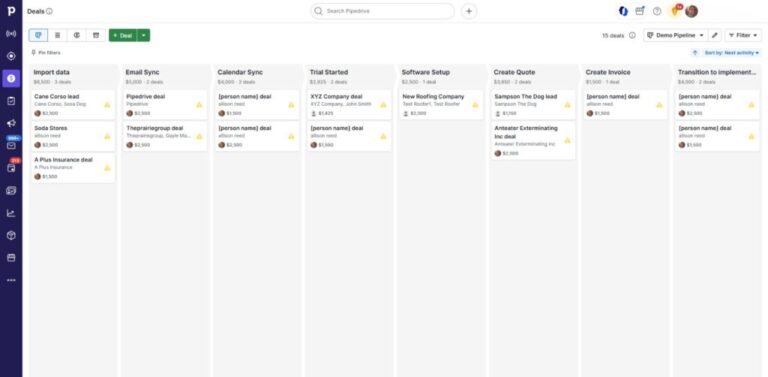
Starting with a clean slate is key. In the first week, focus on setting up Pipedrive. Clear steps will make your team feel confident. Begin by customizing the dashboard to match your sales process. This way, everyone knows exactly where to start each day. Train your team on the basics: logging in, adding deals, and tracking activities. It’s about building comfort with the system.
Next, assign roles. Make sure each team member knows their specific tasks within Pipedrive. This creates accountability. By the end of Week 1, everyone should have logged into Pipedrive at least five times and added new leads. This builds familiarity and ensures your setup is ready for action.
Week 2: Speed to Lead System
Now that your team is comfortable with Pipedrive, it’s time to focus on speed. The faster you respond to leads, the better. Your goal this week is to reduce lead response time to under 10 minutes. Start by setting alerts for new leads. This way, your team knows the moment a lead comes in.
Teach your team how to prioritize leads. Use tags and filters to identify hot leads quickly. Encourage them to make that first contact as soon as possible. The longer you wait, the colder the lead gets. By the end of Week 2, your team should have a routine for immediate lead follow-up in place.
Week 3: Follow-Up Automation
Week 3 is all about making follow-up a breeze. Automated follow-ups keep deals moving without manual effort. Start by setting up email templates for common responses. This saves time and ensures consistency. Create automated reminders for follow-up calls. This keeps the pipeline flowing and ensures no lead slips through the cracks.
Also, integrate Pipedrive with your calendar. This way, appointments are automatically scheduled and synced. By the end of the week, your team will have a streamlined follow-up process that works like clockwork. This sets the stage for ongoing success.
Driving Team Engagement
CRM Adoption Training Tips
Engagement is the lifeblood of CRM success. Keep your team motivated by celebrating small wins. When someone closes a deal using Pipedrive, acknowledge it. Recognition fosters a sense of achievement and encourages others.
Provide ongoing training sessions to address any concerns. Make these sessions interactive, encouraging questions. When your team knows they have support, they’re more likely to keep using the system. Remember, a well-trained team is a productive team.
Sales Enablement Checklist
A checklist ensures nothing falls through the cracks. Start with essentials: a clear sales process, templates for communication, and a list of key contacts. Ensure everyone knows how to access and use these resources.
Regularly update the checklist to reflect any changes in your sales strategy. This keeps the team aligned and focused. By having these tools at their fingertips, your team will feel empowered to reach their targets with confidence.
CRM Onboarding Best Practices
Smooth onboarding reduces resistance. Begin with a welcome session that outlines what to expect. This sets the tone. Pair new team members with a mentor who can guide them through their first month. A buddy system provides support and builds camaraderie.
Offer online resources, like video tutorials, for self-paced learning. This caters to different learning styles. With these practices, new hires will quickly become productive members of your team.
Tools and Integrations for Success
Apollo.io Pipedrive Integration
Integrating Apollo.io with Pipedrive supercharges your lead generation. This tool helps you gather detailed information about potential clients. Set up Apollo.io to automatically sync with Pipedrive. This ensures that every lead captured is instantly available for your team to follow up on.
Train your team on using this integration effectively. This will enable them to focus on the most promising leads. With Apollo.io in your toolkit, you can enhance your lead generation efforts and drive results.
JustCall Pipedrive Integration
Effective communication is vital for closing deals. JustCall allows you to manage calls directly from Pipedrive. Sync your contacts and call logs seamlessly. This integration keeps all communication in one place, reducing the chance of missed calls.
Ensure your team knows how to utilize JustCall for scheduling calls and leaving notes. This will increase their efficiency and improve client interactions. With this setup, your team is equipped to handle calls professionally.
PandaDoc Pipedrive Templates
Creating proposals can be time-consuming. PandaDoc streamlines this by offering ready-to-use templates. Integrate it with Pipedrive to auto-populate proposal fields. This reduces manual entry and speeds up the process.
Show your team how to customize these templates to match client needs. Quick and personalized proposals can make a big impact. By the end of this setup, your team will create proposals faster, leaving more time for closing deals.